

EASTERN SAMAR STATE UNIVERSITY GUIUAN CAMPUS LIBRARY

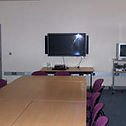
AUDIO-VISUAL ROOM
Audiovisual Room that can be used for class viewing of multimedia. Reservations should be set beforehand to use the Audiovisual Room. To reserve approach the Circulation desk and fill up a reservation form to set up a schedule for your class viewing. A minimum of 50 attendees is required to reserve the Audiovisual Room. Reservations are posted at the whiteboard outside the Audiovisual Room.
Amenities include a seating capacity for 60 people (max), surround sound system, and an 50-inch LED television. Videos can be played from USB drives, DVD or CD.

DISCUSSION ROOM
Reservations for discussion room are handled by the staff at the E-Learning room. Users must come in a group of at least three (7) people to make a reservation. They can use the discussion room for two hours which can be extended if there are no other incoming users. Reservations cannot be made in advance; discussion room tables are given in a first come-first serve basis.

ONLINE PUBLIC ACCESS CATALOG
Use OPAC to:
• Find books, journals, thesis, audiovisual, own by the library.
• View a list of items on loan to you
• Check on fines & recalls
• Find out what is on Reserve for your courses
• Find the latest titles

E-LEARNING
Internet access is available on our workstations at the E-Learning.
We have about 20 workstations to choose from. Basic tech support can be availed by approaching the staff at the E-learning counter or at the reference desk.
For those who want to study outside the electronic resources area or at the discussion rooms, they can connect to the Internet on their laptops and smartphones via our Wi-fi network.